Patch 3.2 | Endless Survival
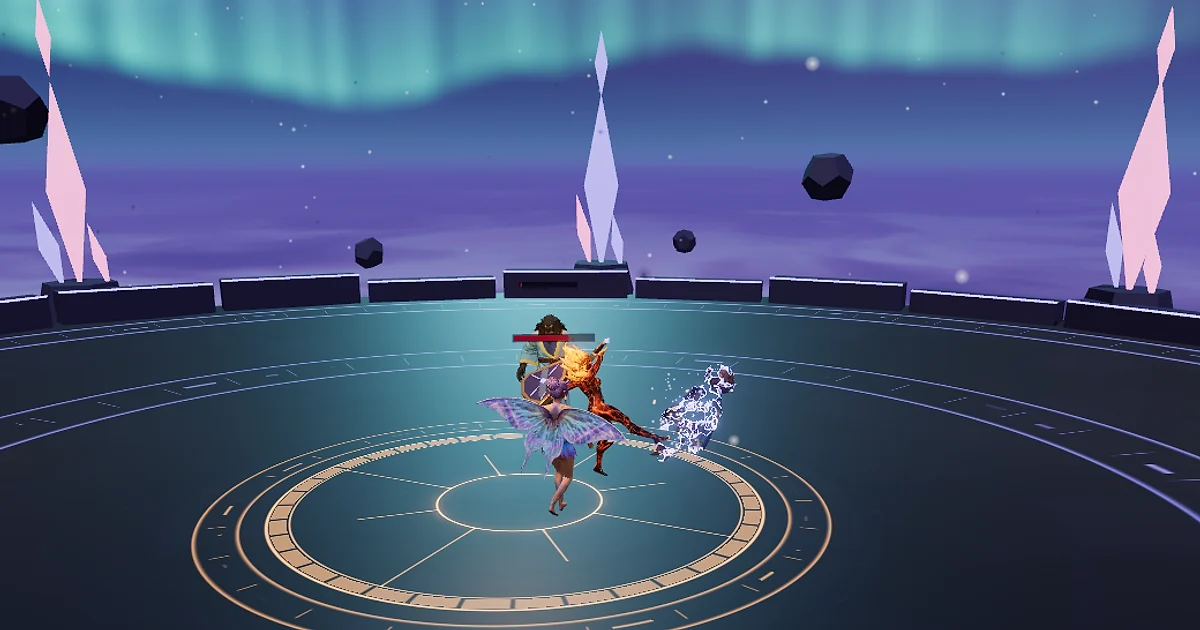
Your 3D hero can fight now. Endless Survival drops your character into an arena against wave after wave of heroes the community made, and every wave hits harder than the last. And everything you can do in 3D on dndai.app now lives in one place: the new 3D page in the menu.
Endless Survival
Your hero against everyone else's
Pick one of your characters and step into a floating arena. Your opponents are real 3D heroes built by other players, so no two runs look the same. Clear a wave, catch your breath for a few seconds, and the next one comes in bigger: more fighters, more health, harder hits and quicker attacks. How far can you get?
Play right away
No account or 3D hero needed
No 3D hero of your own yet? Pick one of the heroes the community made and fight right away, even without an account. Sign in to put your runs on the leaderboard, and when you are ready, make your own hero from a single image and forge it in 3D. If you pick one of your characters that has no 3D model yet, we take you straight to the forge.
Fight with style
Combos, flurries, guards and air juggles
Your hero carries a new greatsword and shield, and both have a job. Chain three quick slashes, or pause after the first one and break into a flurry of stabs that keeps going as long as you keep clicking and ends in a shield-driven finisher. Hold your guard to block, and block right as a hit lands for a perfect guard: the attacker staggers, time slows for a moment and your next click is a heavy counter. Lock on to launch an enemy into the air, click again to leap after it, keep it up there with an air combo you can loop, and jump off enemies in the air to keep a juggle going, then slam it into the ground.
Every click counts: press during a swing, or right after you take a hit, and the attack is queued for the first moment your hero can move. Every blow lands with weight: the action freezes for a heartbeat and sparks fly, while the camera stays steady.
- Left click attacks, up to three hits in a row
- Left click, pause, then keep clicking unleashes the flurry; stop clicking for its finisher
- Hold F to guard. Guard just as a hit lands for a perfect guard, then left click to counter
- Hold right click to lock on to an enemy, Tab switches target. Locked on, the direction you hold picks the move:
- S + left click (away from your target) launches it into the air
- Left click right after a launch leaps after the enemy
- W + left click (toward a distant target) dashes in with a thrust
- Space with a direction held dashes: sideways around your target, toward it to close in, away from it to back off. You can't be hit mid-dash
- Left click in the air starts the air combo, and keeps it going
- S + left click in the air (locked on) slams the enemy into the ground
- Space jumps, and cancels an attack into a jump. In the air next to an enemy, it kicks off them: your double jump and air combo come back
- X dodges in the direction you are moving. In the air it is an air dodge, once per jump
- Hold F in the air to guard in mid-air
- T taunts: finish it unhurt for a burst of style points
- On phones: on-screen buttons for attack, jump and roll, plus Lock and Guard buttons to hold and a Style button. The health, wave and style displays shrink to stay out of your way
Two fighting styles
Blade and fists, switched mid-combo
Put the sword away and fight with your fists: quicker, closer and built for long combos. Press Q to switch at any moment, even in the middle of a combo, and the combo carries on in the other style. Switching mid-combo earns style points.
- Left click throws a five-hit string of punches and kicks
- Left click, pause, then click breaks into a rush of rapid punches that ends in a palm strike
- S + left click (locked on) is an uppercut, and left click right after it rises into the air with the enemy
- W + left click (toward a distant target) dashes in with a punch
- S + left click in the air (locked on) dives down with a kick
- A perfect guard with your fists sets up a dashing counter
Enemies react with new animations: they stagger, get knocked back, tumble when you launch them, crash down and get back up. An enemy you defeat in mid-air falls away and fades out right there, so you can move straight on to the next one.
Style rank
From D to SSS
Hits fill your style meter and climb the ranks from D to SSS, from Drifter all the way to Legend. Mix your moves up: repeating the same attack earns less, the meter drains when you stop, and taking a hit costs you a big chunk of it. A higher rank means more points for every enemy you defeat.
Leaderboard
Wave first, then score
When your hero falls you see the wave you reached, your kills, your score and your best style rank. Signed in, every run goes to the Survival leaderboard on the 3D page. Ranking goes by wave, then score, and the faster run wins a tie.
Everything 3D in one place
One menu entry, one way in
3D Showcase, 3D Home and the test drive used to be spread across the menu bar, the account menu and your character pages. Now there is one entry, 3D, that leads to a page with everything on it:
- Play: Endless Survival with its leaderboard, Test Drive, 3D Home and the Worlds Showcase
- Make your own: forge a 3D hero from a character image, or turn one of your dndai.app images into a 3D scene
- Community heroes: the heroes players made, the same ones you face in the arena
Every mode starts the same way: sign in if you need to, pick your character and go. The picker shows each hero as a clean cut-out portrait. If you have just one character, Test Drive skips the picker. Old links still work.
3D scenes from the 3D page
Pick an image, get a world
You no longer have to find the image first. Hit Create a 3D Scene on the 3D page and pick one of the images you created on dndai.app. A tavern, a forest or a dungeon works best. About five minutes later you can walk through it.
Also new
- Community heroes now show as clean cut-out portraits on a stage instead of in-game snapshots
- Companions keep their own portrait when you forge them in 3D, and no longer replace their owner's
- Loading screens, tutorials, controls and other 3D menus now match the rest of dndai.app
- Zombies has been retired from the menu
Try it
- Open 3D in the menu
- Hit Play Endless Survival and pick your hero
- No 3D hero yet? Forge one from your character's image first
Welcome to Patch 3.2. See you on the leaderboard.